
Light Capture: Gestore di screenshot gratuito per professionisti Windows
Gli screenshot sono facili da scattare, ma spesso sono difficili da ritrovare. Light Capture ora è disponibile per aiutare i professionisti Windows a trasformare gli screenshot in record operativi organizzati e ricercabili.
Cos'è Light Capture? Light Capture è un gestore gratuito di screenshot per Windows di Obviousidea. Aiuta i professionisti a catturare, organizzare, cercare e riutilizzare screenshot con la navigazione basata su cartelle, ricerca OCR, metadati, commenti e strumenti di elaborazione batch.
Light Capture a colpo d'occhio
- Light Capture è uno strumento gratuito per la gestione degli screenshot per Windows di Obviousidea.
- Aiuta i professionisti a catturare, organizzare, cercare e riutilizzare screenshot.
- Va oltre la semplice cattura dello schermo, concentrandosi su OCR, metadati, cartelle e flusso di lavoro post-cattura.
- È particolarmente utile quando gli screenshot diventano record di lavoro, non immagini temporanee.
Puoi anche Scopri di più sulla gestione degli screenshot Light Capture Nella pagina del prodotto.
Perché creare un altro strumento per fare screenshot?
Windows include già uno strumento semplice per fare screenshot. Per molte necessità occasionali, questo è sufficiente. Premi una scorciatoia, catturi una parte dello schermo, copi l'immagine e vai avanti.
Light Capture è diverso perché non si concentra solo sul momento della cattura. Si concentra su ciò che accade dopo che lo screenshot è stato scattato. Dove è archiviato il file? Riesci a riconoscerlo dopo? Puoi cercarlo per data, cartella, fonte, commento o contenuto testuale? Puoi usarlo come parte di un caso professionale, rapporto, fascicolo di supporto o fascicolo cliente?
Questo è il vero problema che Light Capture cerca di risolvere. Gli screenshot sono spesso trattati come immagini temporanee, ma per molti professionisti sono documenti di lavoro. Possono mostrare una pagina, un messaggio, un errore, un dettaglio di proprietà, uno stato prima e dopo, oppure una prova visiva che deve essere mantenuta con il contesto.
Cosa fa Light Capture
Light Capture ti aiuta a catturare, organizzare, cercare e riutilizzare screenshot su Windows. Può catturare uno schermo, una finestra, una regione o contenuti scorribili quando una pagina o finestra non si adatta a uno schermo.
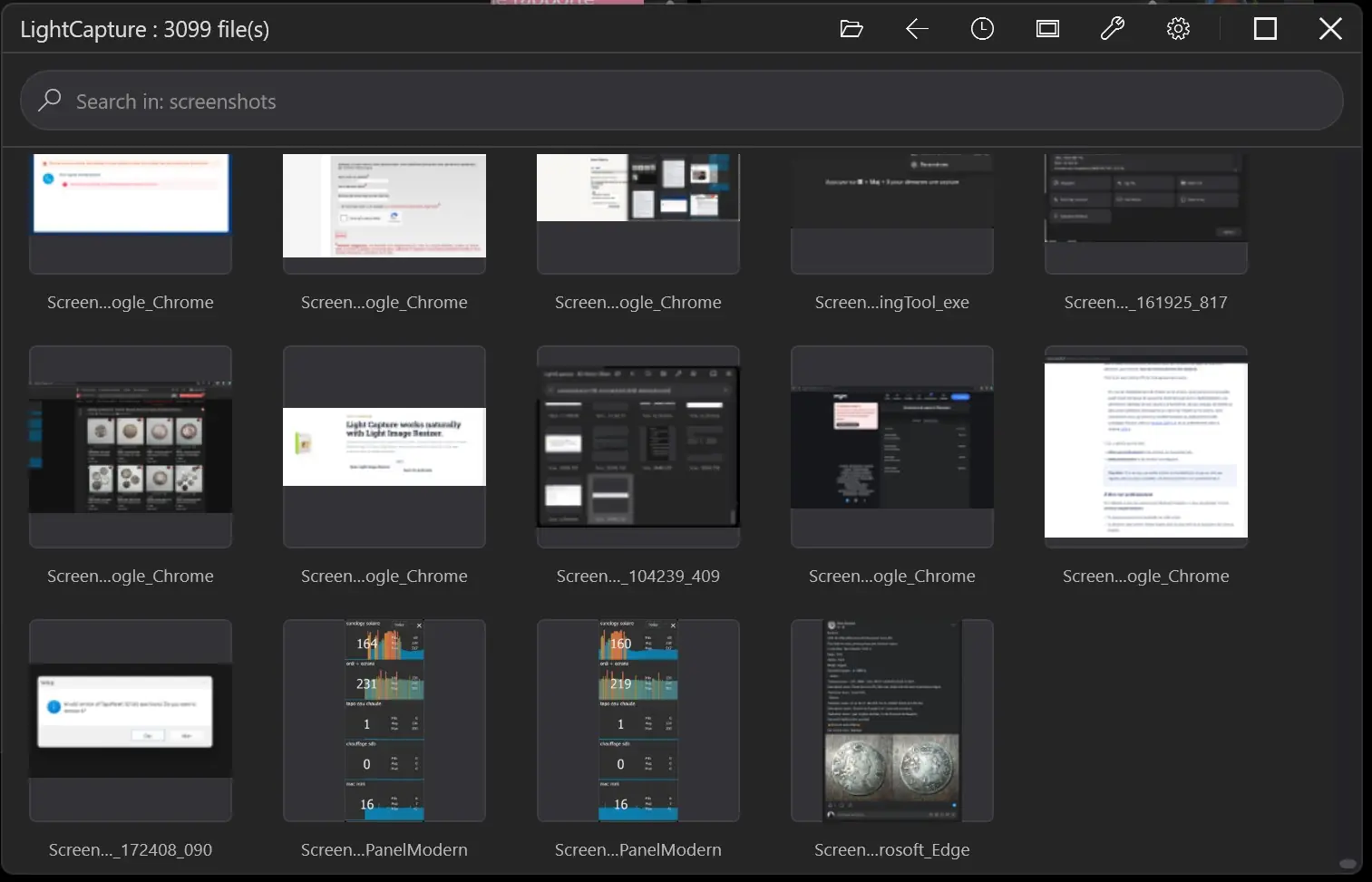
Dopo la cattura, lo screenshot viene conservato in una cartella normale di Windows selezionata dall'utente. Questo è importante. I tuoi file restano normali file immagine nelle tue cartelle. Light Capture aggiunge un flusso di lavoro più veloce attorno a loro invece di costringerti a una libreria di app isolata.
- Scatta screenshot dai flussi di lavoro di Windows.
- Salva le catture nella cartella che stai usando per un progetto o un caso.
- Sfoglia gli screenshot con anteprime grandi e navigazione veloce.
- Cerca nelle cartelle di screenshot per nome file, data, estensione, dimensione, valutazione, metadati, commenti e contenuti OCR.
- Usa la ricerca di Windows e la sintassi avanzata delle query senza dover ricordare ogni comando.
- Prepara le catture per OCR, metadati, elaborazione batch, ridimensionamento, conversione e futuri flussi di lavoro assistiti dall'IA.
Più che cattura e annotazione
Molti strumenti per fare screenshot competono su modalità di cattura e funzionalità di annotazione. Queste caratteristiche contano, ma non sono tutta la storia. Il problema più difficile si presenta dopo settimane o mesi di lavoro, quando la cartella contiene centinaia o migliaia di immagini.
Light Capture si basa sull'idea che uno screenshot debba diventare ricercabile e riutilizzabile. Uno screenshot può essere collegato all'applicazione sorgente, a una cartella funzionante, a testo OCR, commenti, metadati di Windows o a un flusso di lavoro batch più ampio. Questo rende più facile trovare una cattura in seguito e capire perché è stata salvata.
Ad esempio, uno strumento semplice per fare screenshot può aiutarti a catturare un'email. Light Capture è progettato per aiutarti a tenere lo screenshot dell'email nella cartella giusta del caso, a previsualizzarlo rapidamente, cercarlo successivamente e includerlo in un flusso di lavoro professionale più ampio.
Light Capture vs. Microsoft Snipping Tool
Lo strumento Microsoft Snipping Tool è utile per catture rapide con scorciatoie come Print Screen o Windows + Shift + S. Light Capture può anche adattarsi a questo flusso di lavoro. È progettato per coesistere con il comportamento normale di Windows e aiutare a elaborare gli screenshot dopo la loro creazione.
La differenza non sta solo nel scattare l'immagine. La differenza sta nella gestione dello screenshot come un file che potrebbe dover essere ricercato, ordinato, commentato, riutilizzato, stampato, ridimensionato, convertito o collegato a un compito professionale.
| Strumento base per lo screenshot | Light Capture |
|---|---|
| Cattura rapidamente un'immagine. | Cattura e poi aiuta a gestire lo screenshot come file di lavoro. |
| Utile per copiare e incollare occasionalmente. | Utile per cartelle di screenshot che devono essere ritrovate in seguito. |
| Si concentra sul momento della cattura. | Si concentra su cattura, OCR, metadati, ricerca, anteprima e riutilizzo. |
| Spesso lascia il contesto all'utente. | Aiuta a collegare gli screenshot a cartelle, commenti, fonti, data e flussi di lavoro professionali. |
Per una panoramica più approfondita delle funzionalità, visita il Light Capture pagina prodotto.
Progettato per casi d'uso professionali
Light Capture è utile per chiunque catturi spesso schermi, ma siamo particolarmente interessati ai feedback di professionisti che lavorano quotidianamente con i record visivi.
Avvocati e team legali
Conserva registri visivi, registrazioni del sito web, messaggi, documenti dei clienti o prove online in cartelle organizzate.
Esperti e consulenti
Documentare osservazioni, questioni tecniche, stati prima e dopo e materiale del caso con contesto ricercabile.
Agenti immobiliari
Raccogli le pagine delle proprietà, i dettagli degli annunci, confronti visivi, diagnostiche e screenshot relativi ai client nelle cartelle del progetto.
Squadre di supporto
Traccia messaggi di errore, schermate software, situazioni dei clienti e passaggi di risoluzione dei problemi con più contesto rispetto a un semplice file immagine sciolto.
Professionisti dell'immagine
Usa la navigazione delle cartelle, le anteprime, l'ordinamento orientato alle valutazioni e strumenti batch senza aprire software più pesanti per ogni compito.
Utenti avanzati
Costruisci un flusso di lavoro locale più veloce per screenshot ricorrenti, cartelle, filtri di ricerca, testo OCR e azioni ripetute dei file.
Questi esempi sono solo un punto di partenza. L'obiettivo è far evolvere Light Capture da un uso reale, non da una checklist generica di funzionalità.
Scaricare e usare gratuitamente
Light Capture è gratuito da scaricare e utilizzare. Gli utenti con una licenza software Obviousidea attiva ricevono accesso esteso – I dettagli sono disponibili sul Light Capture pagina prodotto. L'obiettivo è semplice: rendere il lavoro sugli screenshot più facile, veloce e utile nei flussi di lavoro reali di Windows.
Se usi già Light Image Resizer o un altro prodotto Obviousidea, Light Capture puoi estendere il tuo flusso di lavoro su screenshot, file immagine, OCR, organizzazione dei file e elaborazione batch. Se sei nuovo a Obviousidea, è anche un modo semplice per scoprire come sono costruiti i nostri strumenti Windows: pratico, diretto e focalizzato sul lavoro reale.
Vogliamo il tuo feedback
Light Capture è disponibile ora ed è progettato per evolversi. Vogliamo feedback da utenti che hanno veri problemi con gli screenshot: troppe cattura, contesto mancante, cartelle difficili da cercare, ordinamento manuale ripetitivo o vincoli professionali specifici.
Dicci cosa devi catturare, come organizzi i tuoi file, cosa devi trovare in seguito e quali compiti ripetitivi dovrebbero essere più semplici. I feedback di avvocati, esperti, agenti immobiliari, team di supporto, fotografi e altri professionisti aiuteranno a decidere i prossimi miglioramenti.
I miglioramenti futuri potrebbero concentrarsi su una migliore automazione, taggatura più ricca, flussi di lavoro dei dossier più forti, reportistica, uso di IA locale rispettoso della privacy o altre esigenze che provengono direttamente dagli utenti.
Domande veloci
Cos'è Light Capture?
Light Capture è un gestore gratuito di screenshot per Windows di Obviousidea. Aiuta gli utenti a catturare, organizzare, cercare e riutilizzare screenshot con OCR, metadati, commenti e flussi di lavoro basati su cartelle.
È Light Capture gratis?
Sì. Light Capture è gratuito da scaricare e utilizzare. Gli utenti con una licenza software Obviousidea attiva e aggiornata ricevono un accesso esteso, con dettagli disponibili nella pagina prodotto.
In cosa è diverso dallo strumento di taglio di Microsoft?
Lo strumento Microsoft è utile per catture rapide. Light Capture è progettato per il flusso di lavoro completo degli screenshot: salvataggio, navigazione, ricerca, OCR, metadati, commenti, cartelle e riutilizzo.
Chi dovrebbe provarci per primo?
I professionisti che conservano screenshot come registri dovrebbero provarci prima: team legali, esperti, consulenti, agenti immobiliari, team di supporto, fotografi e utenti avanzati di Windows.
Light Capture è uno strumento gratuito di Obviousidea e un primo passo verso un flusso di lavoro degli screenshot più completo per i professionisti di Windows.