
TapoPanel: a desktop dashboard for Tapo smart plug energy monitoring, temperature sensors, and history.
TapoPanel shows real-time power consumption from Tapo P110, P115, and P110M energy-monitoring smart plugs, plus temperature and humidity from TP-Link Tapo sensors such as Tapo T310 and Tapo T315. Recover history for your smart plugs and sensors directly from your computer, without opening the mobile app.
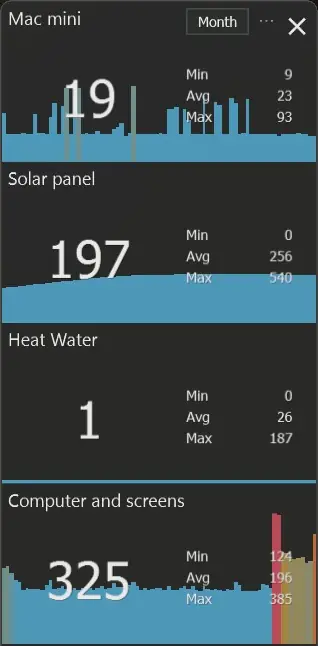
Real-time power and temperature
No app switching. No phone unlock. Keep real-time power consumption, temperature, and humidity visible while you work.
Made for real workflows
Solar production, heater power consumption, office equipment, room temperature, and humidity: keep the smart-home signals you care about in view.
History and CSV export from your computer
Recover historical readings for your Tapo smart plugs and sensors by date, year, month, or day, then export the data as CSV files.
Who uses TapoPanel?
One tool, many situations. All centered on wanting to see energy and temperature data without reaching for your phone.
Solar watchers
Track real-time solar production through a Tapo energy-monitoring smart plug on your desktop.
Room temperature monitoring
Follow Tapo T310 or Tapo T315 temperature and humidity readings for an office, garage, greenhouse, storage room, or comfort checks.
Home office power monitoring
Float a real-time power meter next to your monitors and know exactly how much power your workstation consumes.
Historical data review
Recover historical data from your smart plugs and sensors on your computer and export CSV data for deeper analysis.
Energy monitoring, temperature, and history in one desktop dashboard
Use TapoPanel as an always-visible dashboard for the Tapo smart plugs and sensors that matter during the day.
Everything useful for Tapo energy monitoring. No unnecessary setup.
TapoPanel stays out of your way: real-time energy monitoring, temperature sensors, history and CSV export, no subscription, and no complex smart-home setup.
Always-visible readings
Real-time power, temperature, and humidity readings stay visible on your desktop with no app switching required.
Trend graph per device
Recent power consumption and temperature changes are visualized at a glance so you can spot spikes, drops, and usage patterns instantly.
History and CSV export
Recover historical power consumption and sensor data by date, year, month, or day, then export CSV files from your computer.
Your style
Customize fonts and colors to match your desktop setup so the panel feels like part of your workflow.
Featherweight
Runs quietly in the background with no noticeable performance hit.
TapoPanel vs Tapo app vs Home Assistant energy dashboards
Choose the right way to monitor Tapo plug energy data depending on how much setup and visibility you need.
TapoPanel
Use TapoPanel when you want live watt readings from Tapo P110, P115, or P110M plugs, and temperature or humidity from Tapo T310 and Tapo T315 sensors, always visible on your computer.
- One compact desktop dashboard for several smart plugs and sensors
- No phone unlock and no app switching
- No Home Assistant server required
Tapo mobile app
The Tapo app is still the right place to set up plugs, manage your TP-Link account, and control devices from your phone.
- Good for installation and schedules
- Useful away from your desk
- Less convenient as an always-on monitor
Home Assistant
Home Assistant is powerful if you want whole-home automation, dashboards, scripts, and integrations beyond Tapo plugs.
- Much broader smart-home platform
- Requires more setup and maintenance
- More than needed for simple real-time power monitoring
Up and running in 3 minutes
No complex setup. Install, add your plug or sensor, and see live data.
Launch & add device
Open TapoPanel and click Add to connect your first Tapo smart plug or temperature sensor.
Enter the smart plug IP address
Find the local IP in the Tapo mobile app, then paste it into TapoPanel.
Sign in with Tapo
Use the same email and password you already use for your TP-Link account.
See live data
Your device appears with current readings. Open history when you need data from plugs or sensors.
See it in action
Live energy. Track plugs, solar production, heaters, hot water, and office equipment in real time.
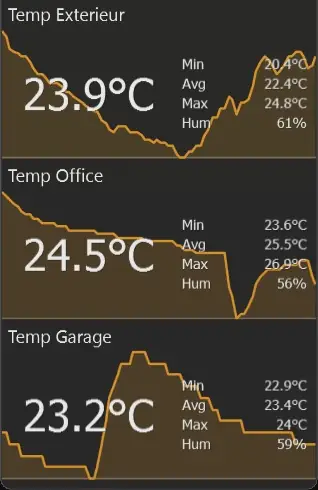
Temperature sensors. Follow outside, office, garage, or other TP-Link Tapo sensor readings.
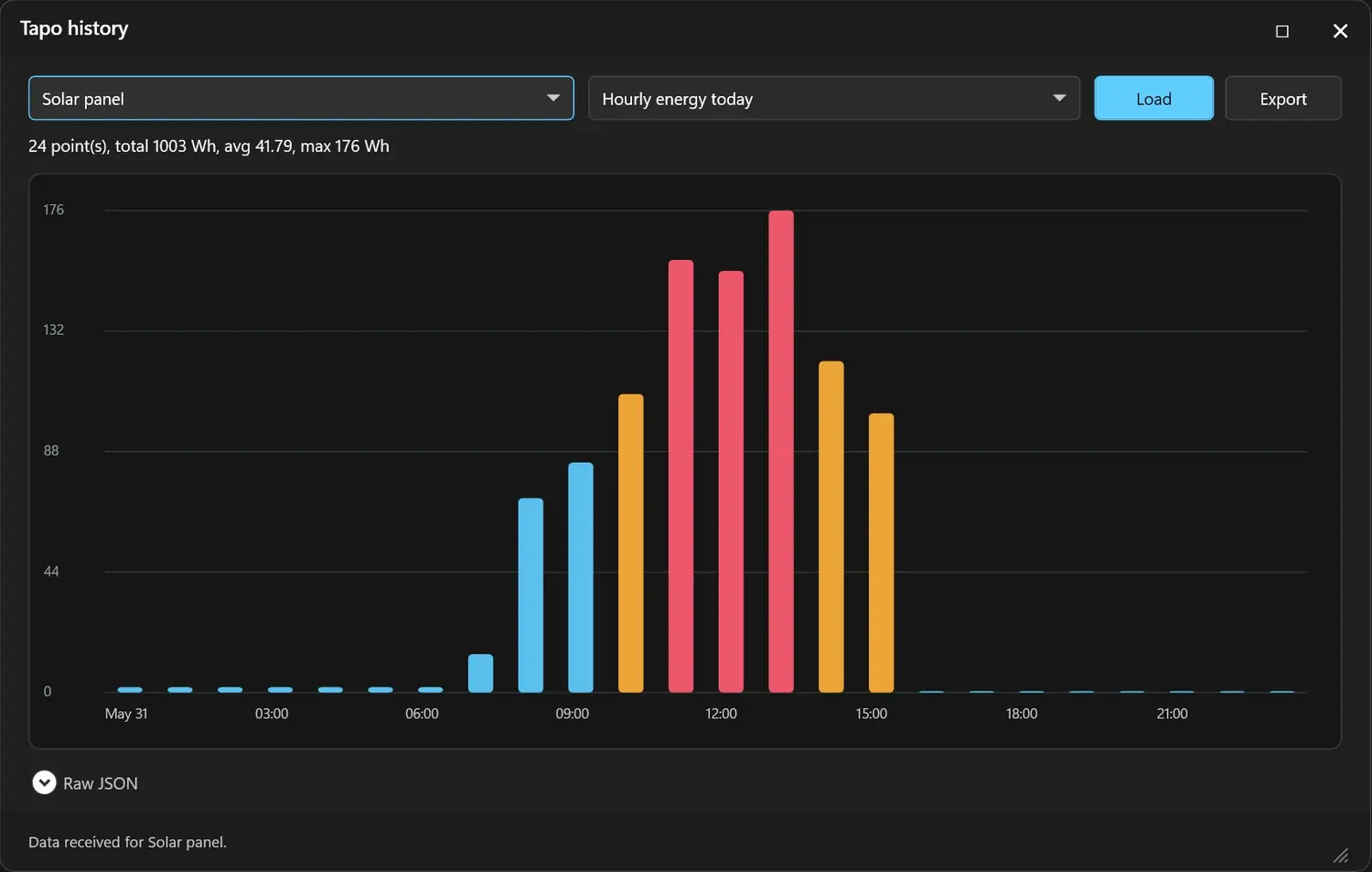
History and CSV export. Recover readings from your plugs and sensors by date, year, month, or day, then export CSV data from your computer.
Free desktop monitor for your Tapo plugs and temperature sensors
Download, connect your plugs or Tapo temperature sensors, and recover live and historical data directly from your computer.
Download TapoPanel Free (Mac)
Compatible Tapo energy-monitoring smart plugs and temperature sensors
TapoPanel supports TP-Link Tapo smart plugs with energy monitoring and Tapo temperature / humidity sensors. Common sensor references include Tapo T310 and Tapo T315; TP-Link lists these sensors as hub-required devices, typically used with a Tapo hub such as H100.
Tapo device names vary by country. TapoPanel is designed for TP-Link Tapo energy-monitoring smart plugs and Tapo temperature / humidity sensors; suggest additional models on the forum.
Need a Tapo energy plug?
If you do not already own a compatible energy-monitoring plug, the Tapo P110 is the simplest starting point for TapoPanel.
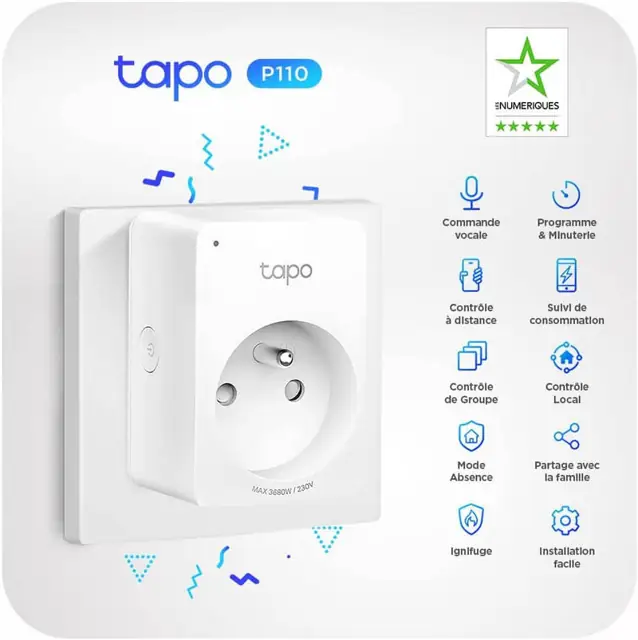 Tapo P110
- ✓Measures real-time power consumption in watts
- ✓Compatible TapoPanel, Alexa & Google Home
- ✓2.4 GHz Wi-Fi – no hub required
- ✓16A / 3680W – heater, water heater, desk setup
- ✓Two smart plugs in the box
TapoPanel FAQ
Short answers for people comparing TapoPanel, the Tapo mobile app, Mac and Windows desktop monitoring, and heavier smart-home dashboards.
Is TapoPanel free?
Yes. TapoPanel is a free download with no subscription and no adware. It works on Windows 8, 10, and 11, and a Mac version is also available.
What is TapoPanel?
TapoPanel is a desktop utility that shows real-time power consumption from compatible TP-Link Tapo smart plugs with energy monitoring, plus temperature and humidity from Tapo sensors, directly on your computer.
Which Tapo devices does it support?
TapoPanel currently supports Tapo P110, P115, and P110M smart plugs with energy monitoring, plus TP-Link Tapo temperature and humidity sensors such as Tapo T310 and Tapo T315.
Can I monitor several plugs and sensors at once?
Yes. TapoPanel is designed to show multiple devices in one compact panel, such as solar output, computer screens, heating, hot water, temperature sensors, and always-on equipment.
Does TapoPanel replace Home Assistant?
No. Home Assistant is a full automation platform. TapoPanel is a lightweight Windows display for people who mainly want live power data without maintaining a smart-home server.
Does it show real-time power monitoring and temperature?
Yes. Energy plugs can show current watt readings and recent graph data; temperature sensors can show current temperature, humidity, and min, average, and maximum values.
Can I recover history and export CSV from my computer?
Yes. TapoPanel can load historical data for your smart plugs and sensors by date, year, month, or day, then export CSV files directly from your computer.
Do I need a hub?
No Tapo hub is required for the supported energy plugs. TP-Link lists Tapo T310 and Tapo T315 temperature / humidity sensors as hub-required devices, typically paired with a Tapo hub such as H100.
Which desktop systems are supported?
TapoPanel is available for Windows desktop users and Mac users. The Windows version is listed for Windows 8, Windows 10, and Windows 11.
Is TapoPanel affiliated with TP-Link?
No. TapoPanel is an independent ObviousIdea utility and is not affiliated with, endorsed by, or sponsored by TP-Link.
For whole-home automation, Home Assistant is a powerful alternative.
ObviousIdea is a participant in the Amazon EU affiliate programme. Product links may generate a commission at no additional cost to you.