
LrToolbox
Originals missing?
Extract the JPEG previews Lightroom still has.
If your original photos are lost but previews are still visible in Lightroom Classic, LrToolbox can extract available JPEG previews from the catalog’s associated preview cache. It cannot restore missing original RAW files, and the number and resolution of recovered previews depend on what remains in that cache.
110 previews
exported in a real catalog test
Preview recovery only
not the missing original RAW files
Results vary
with the previews and metadata available
Test LrToolbox with your own catalog: the trial extracts previews from its first 100 images. English interface only.

Choose the right recovery step
Are the originals lost—or just disconnected?
Moved, renamed or offline?
If the original photos still exist on another folder, drive or network location, locate and relink them in Lightroom Classic first. That preserves access to the original files.
Originals truly unavailable?
If the originals cannot be found but Lightroom previews remain visible, use LrToolbox to extract the available JPEG previews from the associated preview cache.
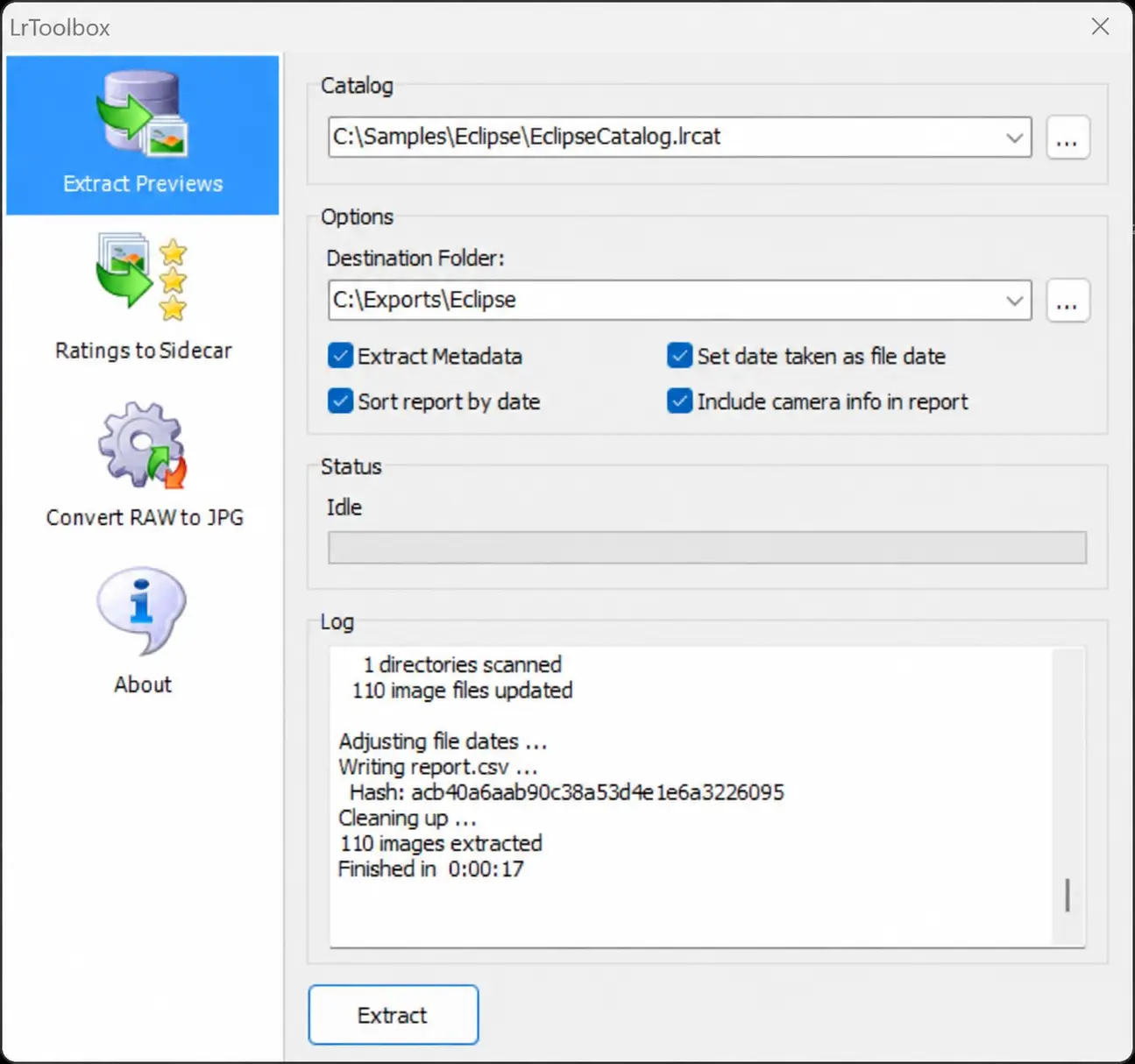
Tested in the real application
A real catalog.
110 recovered previews.
This anonymized screenshot shows a completed LrToolbox extraction from an August 2026 eclipse catalog: 110 entries processed and 110 JPEG previews exported, with a chronological CSV report.
Recovery depends on the previews and metadata that remain available. A recovered JPEG does not replace the missing original RAW file. Tested with LrToolbox 2026.0.1.27.
From catalog to recovered previews
01
Choose your catalog
Select a Lightroom Classic catalog and its preview cache.
02
Extract available previews
Save available JPEG previews to a separate folder.
03
Review photos + CSV
Review recovered previews and available metadata.
What LrToolbox can save — and what it cannot
If a drive failed, a folder was moved or the originals are offline, usable JPEG previews may remain in the preview cache associated with your Lightroom Classic catalog. LrToolbox exports available previews—not the missing original files.
What you may recover
- JPEG previews still present in the catalog preview cache
- Available ratings and metadata
- A chronological
report.csvfor review
What it cannot recreate
- The missing original RAW files
- Resolution or metadata absent from the cached preview
- A complete Lightroom editing history or proof of authenticity
Preview recovery first. Additional tools for ratings and RAW conversion.
Extract available previews
Recover available JPEG previews from a Lightroom catalog and its associated preview cache when originals are missing or offline. Resolution depends on the previews that remain available.
Export ratings and XMP
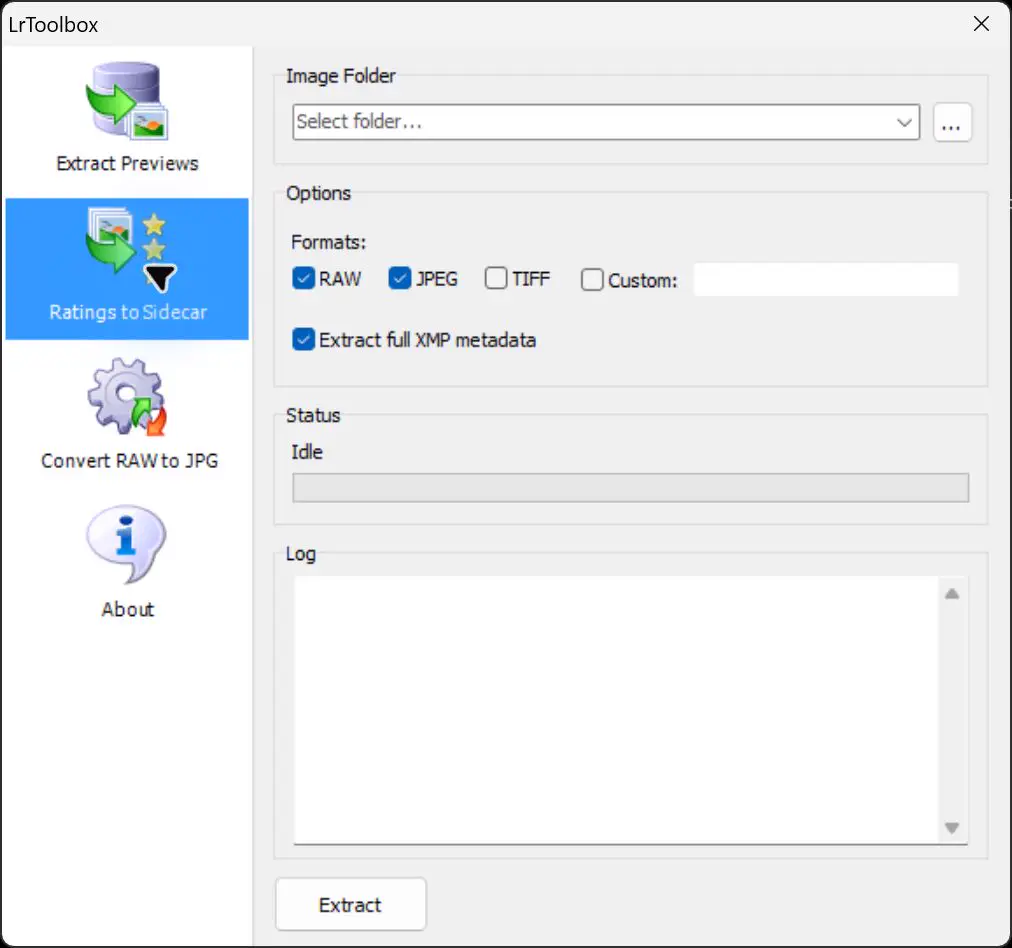
Write star ratings and, optionally, fuller XMP metadata to sidecar files for RAW, JPEG, TIFF or a custom file extension.
Convert RAW files to JPEG
Convert catalog-linked RAW files using rating and JPEG-quality options, with TIFF, EXIF-copy and catalog-backup options. Keep a backup and check original-file handling: the tested default moves originals to the Recycle Bin.
Start with a copy of your catalog and preview files
Keep the catalog and its associated preview folder together. In Extract Previews, select the catalog, choose a separate output folder and enable the metadata and chronological-report options you need. Review the result and any warnings before relying on the recovered files.
Capture chronology
Create a chronological CSV report from available catalog metadata
When metadata is available, LrToolbox can write a chronological CSV report containing capture time, original and recovered filenames, rating, camera make and model, lens, focal length, aperture, exposure time, ISO and approximate focus-distance fields.
| Capture date | Original | Recovered | Rating | Camera | Lens | Exposure | ISO |
|---|---|---|---|---|---|---|---|
| 2026-08-10 17:05:09 | IMG_0001.CR3 | IMG_0001.jpg | 0 | Canon EOS R5 | 100–400 mm | 1/4000 s | 100 |
| 2026-08-13 17:45:22 | IMG_0108.RAF | IMG_0108.jpg | 0 | Fujifilm X-T4 | 18–300 mm | 1/2000 s | 160 |
Anonymized example derived from the tested catalog. Camera serial numbers are intentionally excluded.
For review and documentation—not automatic proof.
A metadata report can help establish a working chronology, identify changes of camera or lens and reveal gaps worth investigating. It does not, by itself, prove authorship, authenticity, location, chain of custody or legal admissibility. Camera clocks and metadata may be incomplete or altered.
Portable decisions
Export Lightroom ratings to XMP sidecars
Export ratings to XMP sidecars so that selections made in Lightroom can remain useful in a wider workflow. Choose RAW, JPEG, TIFF or a custom extension, and decide whether to include fuller XMP metadata.
This is useful for migrations, archives and mixed-software workflows where Lightroom’s catalog is not the only source of organization.
Legal and investigative review
Working with a Lightroom catalog in a photo-evidence matter?
See where preview extraction and a chronological CSV can support review and documentation—and where dedicated forensic acquisition, authentication and chain-of-custody tools remain necessary.
Questions
LrToolbox FAQ
Can I recover photos from a Lightroom catalog if the originals are lost?
You may be able to extract the JPEG previews that remain in the preview cache associated with the catalog. The catalog and cache do not recreate the original image files, and the available number and resolution vary.
What can I test with the trial version?
The trial extracts previews from the first 100 images in your Lightroom Classic catalog, so you can test the workflow with your own data before purchasing.
Can LrToolbox recover the original RAW files?
No. LrToolbox extracts available JPEG previews from the preview cache associated with a Lightroom Classic catalog. A large preview can be valuable, but it is not the missing original RAW file.
Does Lightroom need to be installed?
LrToolbox works directly with the catalog workflow and does not require Lightroom to perform preview extraction.
Can LrToolbox reconstruct a complete editing history?
No. The CSV report is a capture and metadata chronology based on fields available to the application. It is not a complete history of every Lightroom editing action.
Is the report suitable as forensic evidence?
It may support examination and documentation. It does not independently establish authenticity, authorship, chain of custody or admissibility. Preserve original files and catalogs and use an appropriate forensic procedure.
What does the displayed MD5 refer to?
LrToolbox displays an MD5 fingerprint of the generated report.csv. It is a reference for that report file, not a hash of the Lightroom catalog or the source photographs.
Is LrToolbox available in French, Italian or other languages?
While the website is translated, the LrToolbox Windows application itself is currently available in English only.
Independent Windows utility
Recover, export and document what remains in your catalog.
Price: 24.99 EUR (plus VAT). Current version: 2026.0.1.29.
Adobe and Lightroom are trademarks of Adobe Inc. LrToolbox is an independent product and is not affiliated with or endorsed by Adobe.