
LrToolbox for legal and investigative review
Lightroom catalogs in photo evidence review
When a matter includes a Lightroom Classic catalog, available JPEG previews and catalog metadata may help a legal or investigative team understand and organize the photographs it references.
LrToolbox extracts available previews and can create a chronological report.csv for review and documentation. It does not authenticate photographs or replace forensic acquisition and preservation tools.
The trial extracts available previews from the first 100 images in a catalog. Preview availability and resolution depend on the associated preview cache. English interface only.
A narrow, forensic-adjacent supporting role
LrToolbox supports examination of material available through a Lightroom Classic catalog and its associated preview cache. It can prepare review copies and organize available metadata; it does not acquire devices or establish whether a photograph is genuine.
Useful for review and documentation
Lawyers, litigation-support teams, investigators and digital-forensics practitioners can use the output as a structured starting point for examining a Lightroom-based photo collection.
Outside the product’s scope
LrToolbox is not a disk imager, write blocker, authenticity or tamper detector, chain-of-custody platform, eDiscovery system or court-certification product.
Preserve original photographs, catalogs and associated caches, and follow your own forensic procedures. Use appropriately prepared working copies rather than treating extraction as preservation.
Where LrToolbox fits alongside forensic tools
Different tools answer different questions. This comparison describes complementary roles, not equivalent capabilities or superiority.
| Tool or category | Principal role | LrToolbox’s separate role |
|---|---|---|
| EnCase / OpenText Forensic | Broad acquisition, triage, analysis and reporting across evidence sources | Extract available Lightroom-linked previews and catalog metadata for a narrow review task |
| Belkasoft and timeline suites | Multi-source artifact correlation and forensic timelines | Create a chronological CSV from available Lightroom metadata, without cross-source correlation |
| ExifTool and EXIF analyzers | Inspect metadata embedded in source media | Export available catalog metadata and sidecars; not replace source-file inspection |
| Image-authentication tools | Assess authenticity or manipulation indicators | Provide available previews for review; not determine authenticity or detect manipulation |
| Disk imaging and write blocking | Acquire or preserve source material | Operate only after preservation, on appropriately prepared working material |
A cautious workflow for catalog-based review
1. Preserve the source material
Preserve the photographs, Lightroom Classic catalog and associated preview cache according to your organization’s procedures. Prepare working copies and document handling separately.
2. Define the review question
Decide whether you need visual previews, a metadata inventory, a chronological CSV, or ratings and XMP sidecars. Use other tools for acquisition, authentication or missing RAW content.
3. Extract available previews
Extract the JPEG previews still present in the associated cache. These are cached derivatives, not restored original RAW files.
4. Examine the report
Review available fields, note missing values and distinguish recorded metadata from conclusions made during examination.
Create a chronological CSV from available metadata
The report.csv can include capture time, original and recovered filenames, rating, camera make and model, lens, focal length, aperture, exposure time, ISO and approximate focus distance when available.
This organization can help reviewers navigate a collection and identify entries for closer examination. It does not independently corroborate the recorded chronology.
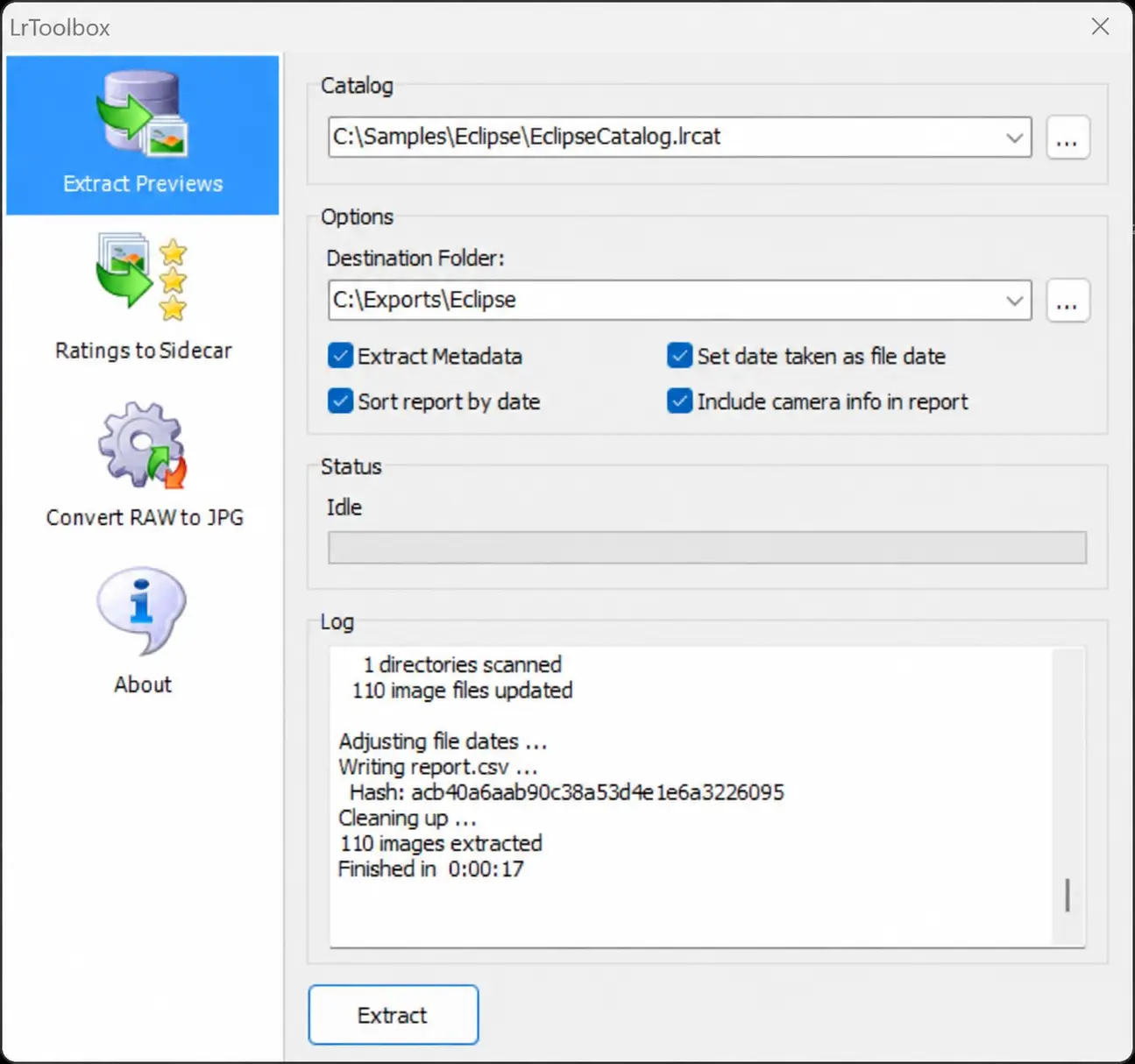
The displayed MD5 fingerprint applies only to report.csv. It does not fingerprint the catalog, extracted previews or original photographs.
One documented catalog test
In one anonymized test, LrToolbox 2026.0.1.27 processed 110 catalog entries and exported 110 JPEG previews with a chronological CSV report. This describes one test, not a universal success rate. Another catalog may contain different previews or none suitable for extraction.
Important limits before examination
- No missing original RAW file restoration.
- Preview availability and resolution depend on the associated cache.
- Exported metadata may be incomplete.
- No independent authentication, authorship, location or event verification.
- No acquisition, write blocking, custody tracking or eDiscovery case management.
- The MD5 shown covers only
report.csv. - RAW-to-JPEG conversion is separate; the tested default moves originals to the Recycle Bin. Back up first and use working copies.
Frequently asked questions
Is LrToolbox digital forensic software?
It has a narrow forensic-adjacent role: extracting available Lightroom previews and metadata for review and documentation. It is not a comprehensive forensic acquisition or analysis suite.
Can it recover missing original RAW photographs?
No. It extracts available JPEG previews from the associated preview cache. A preview is not the original RAW file.
Can the CSV prove a photograph’s date, location or author?
No. It organizes available metadata and can support examination, but does not independently prove when or where an event occurred, who created a photograph, or whether it is authentic.
Does the MD5 cover every exported photograph?
No. The displayed MD5 applies only to report.csv, not the catalog, original photographs or extracted previews.
Does LrToolbox replace EnCase, FTK, Autopsy or authentication tools?
No. Its role is limited to Lightroom catalog preview and metadata extraction. It does not replace acquisition, broader examination, artifact correlation, authentication or eDiscovery workflows.
What can the trial examine?
The trial extracts available previews from the first 100 images in a catalog. This does not guarantee 100 successful extractions; results depend on the previews present in the cache.
Review and documentation
Assess the previews available in your catalog
Start from preserved source material and an appropriately prepared working copy. Use the trial to examine available previews from the first 100 catalog images.
Keep review outputs distinct from preserved originals and apply your own examination and documentation procedures.